



Film & TV
Film & TV
Reviews and collaboration
KLASH is the only platform that covers dailies, post-production, and screening in one single platform.


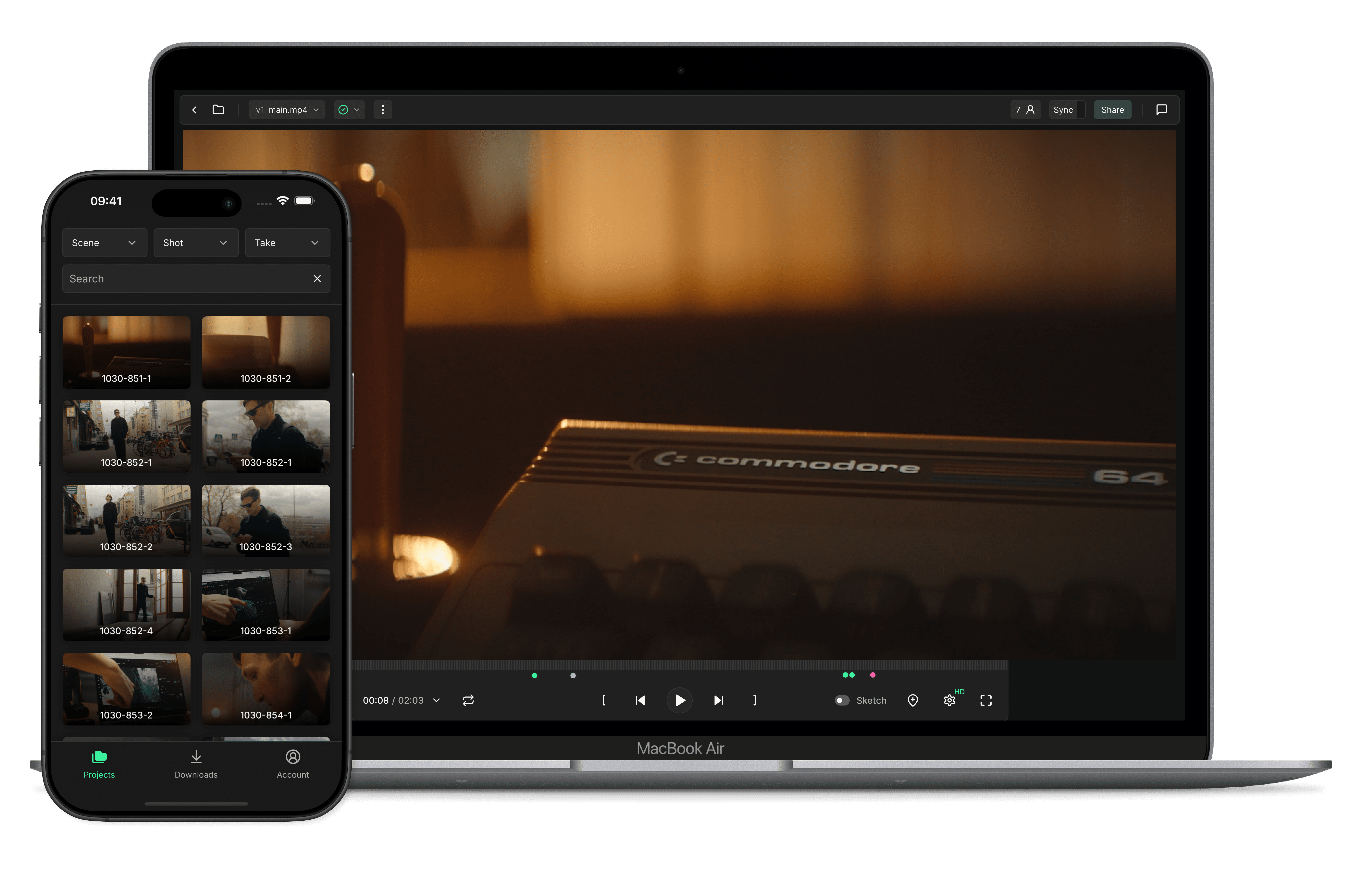
Watch clips without friction
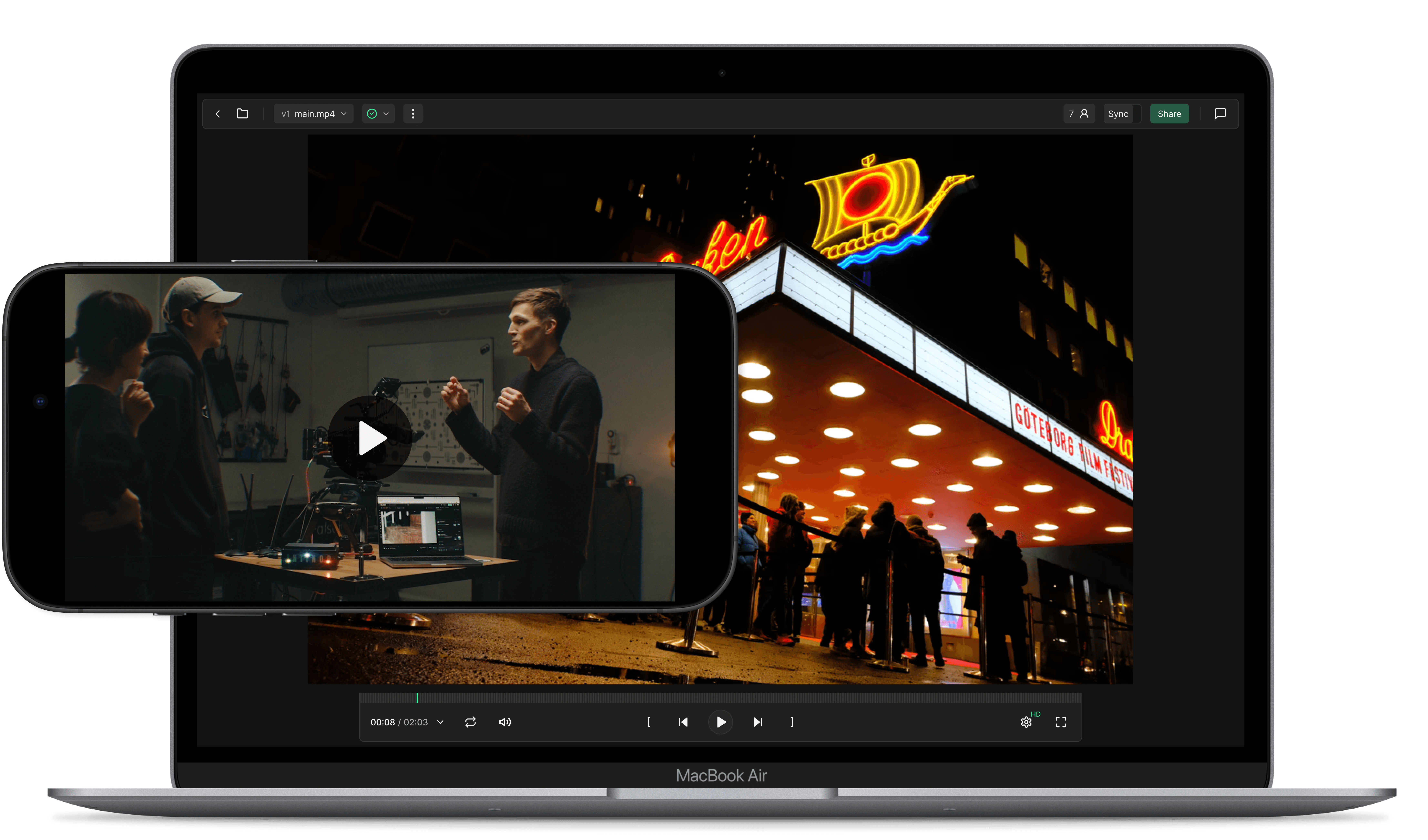
KLASH is the ultimate way to watch your dailies. Upload clips by drag and drop, watch folders or FTP. Play, pause and navigate between clips in a beautiful full-screen viewing experience on desktop, iPhone and iPad. Stream to your TV using AirPlay.


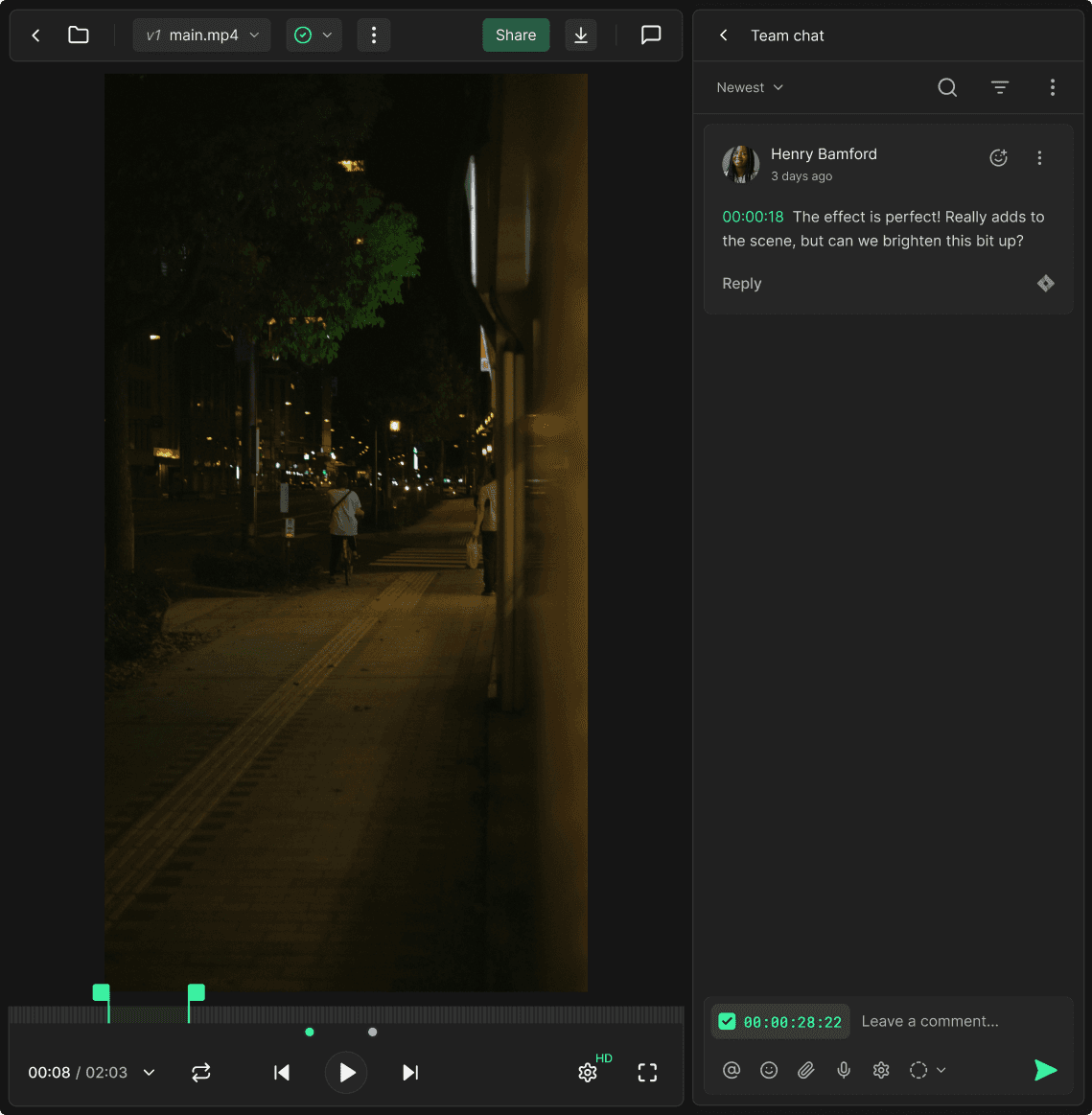
Micro drama and vertical video
KLASH supports both horizontal and vertical videos.
Silverstack and Avid metadata
Now supercharged by Silverstack XML and Avid ALE file imports.



Find the clips you are looking for
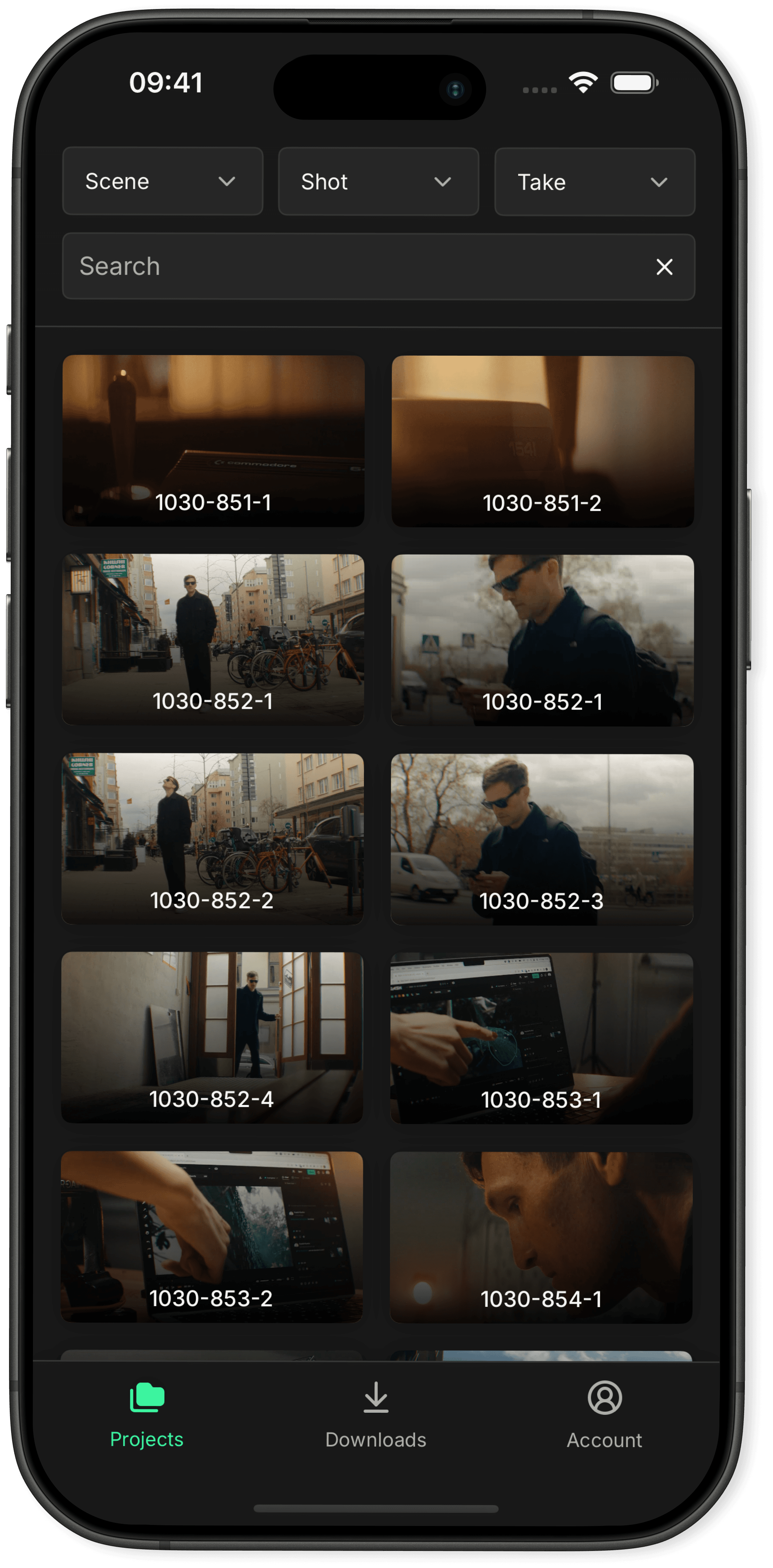
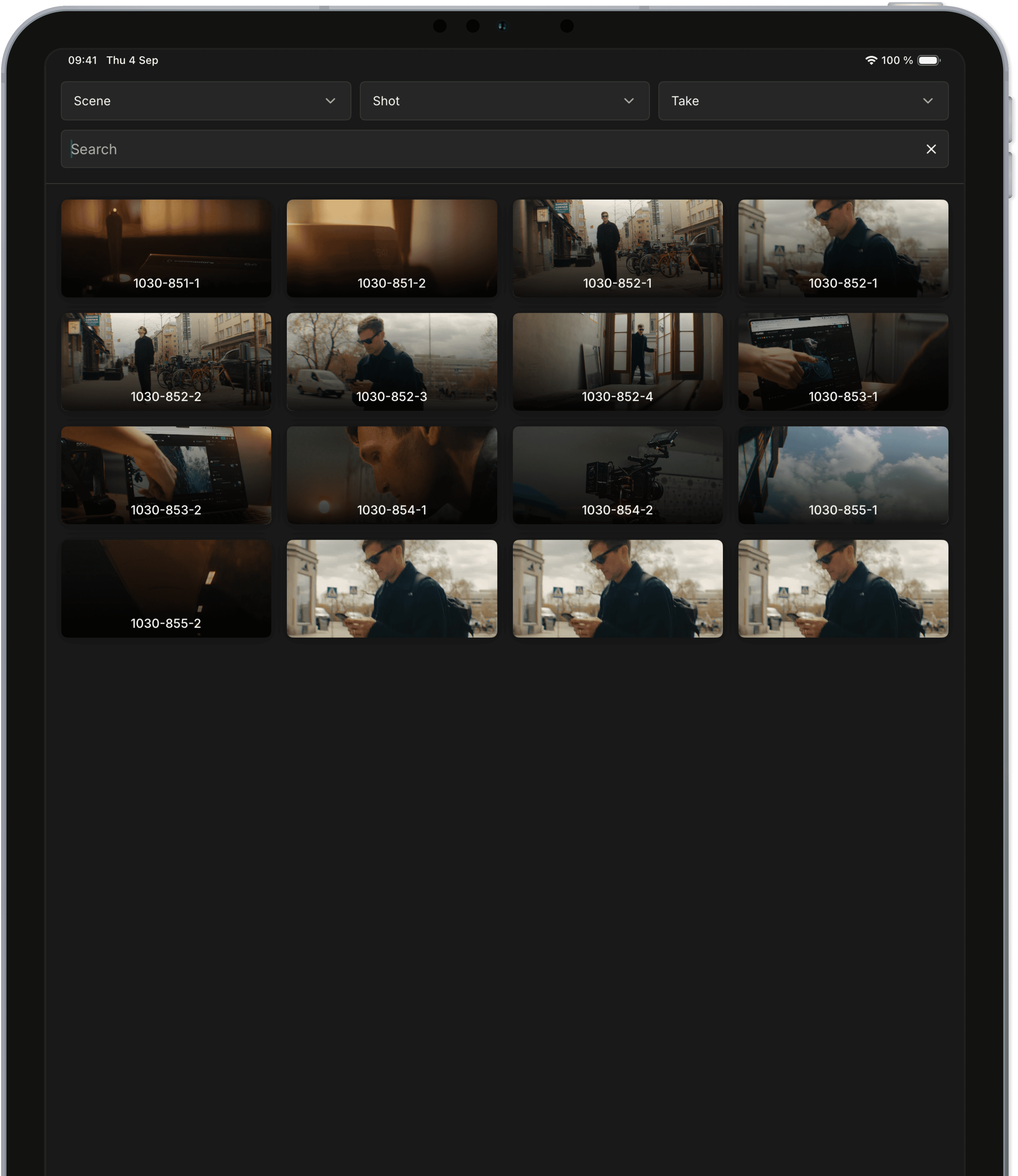
Easily find the clip you are looking for by scene, shot and take. Now in both online and offline mode. Customise the search parameters, and the project's home screen for your team.


KLASH was absolutely indispensable, with the communication via the platform and the smart interface.
Absolutely indispensable, with the communication via the platform and the smart interface.
Real-time reviews
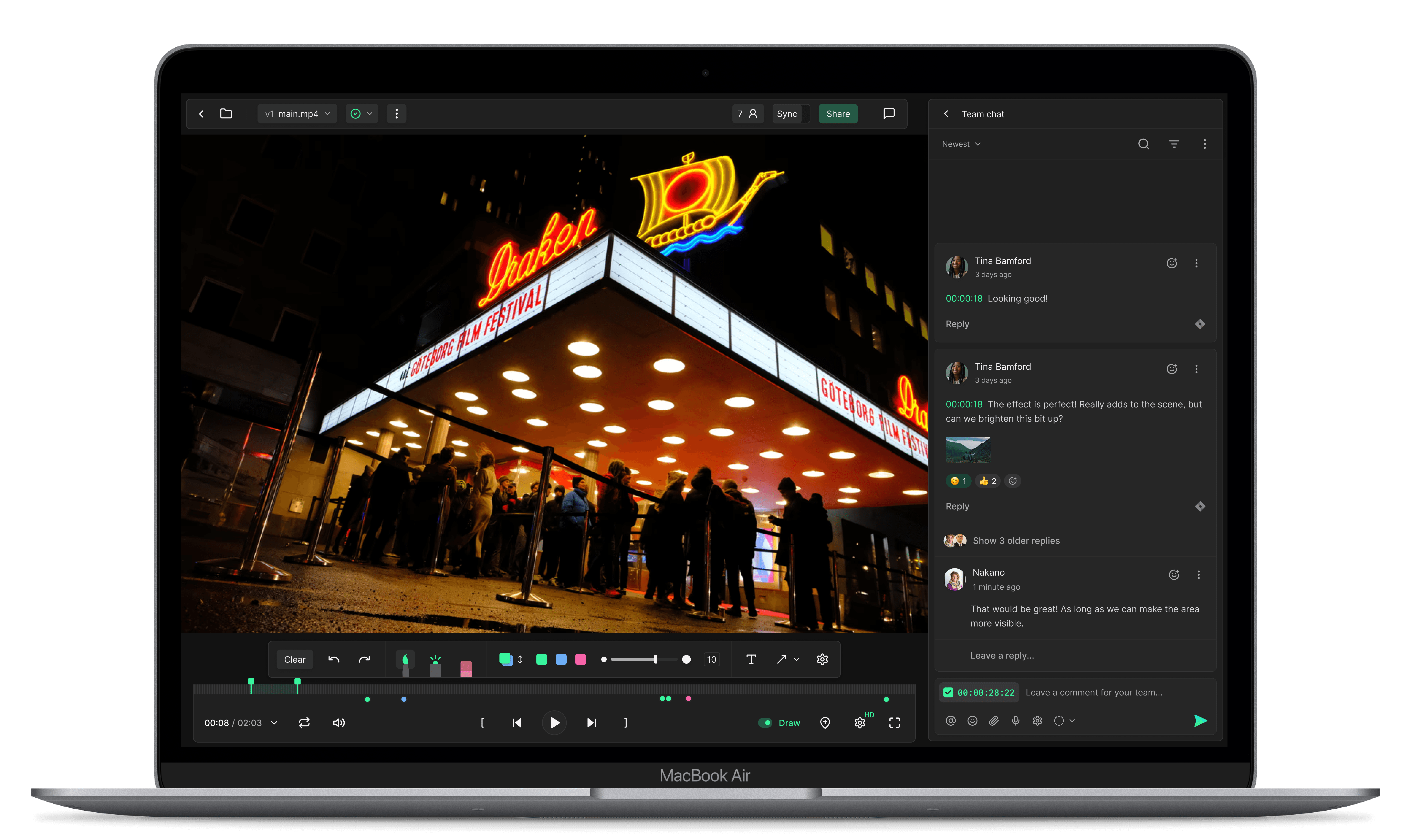
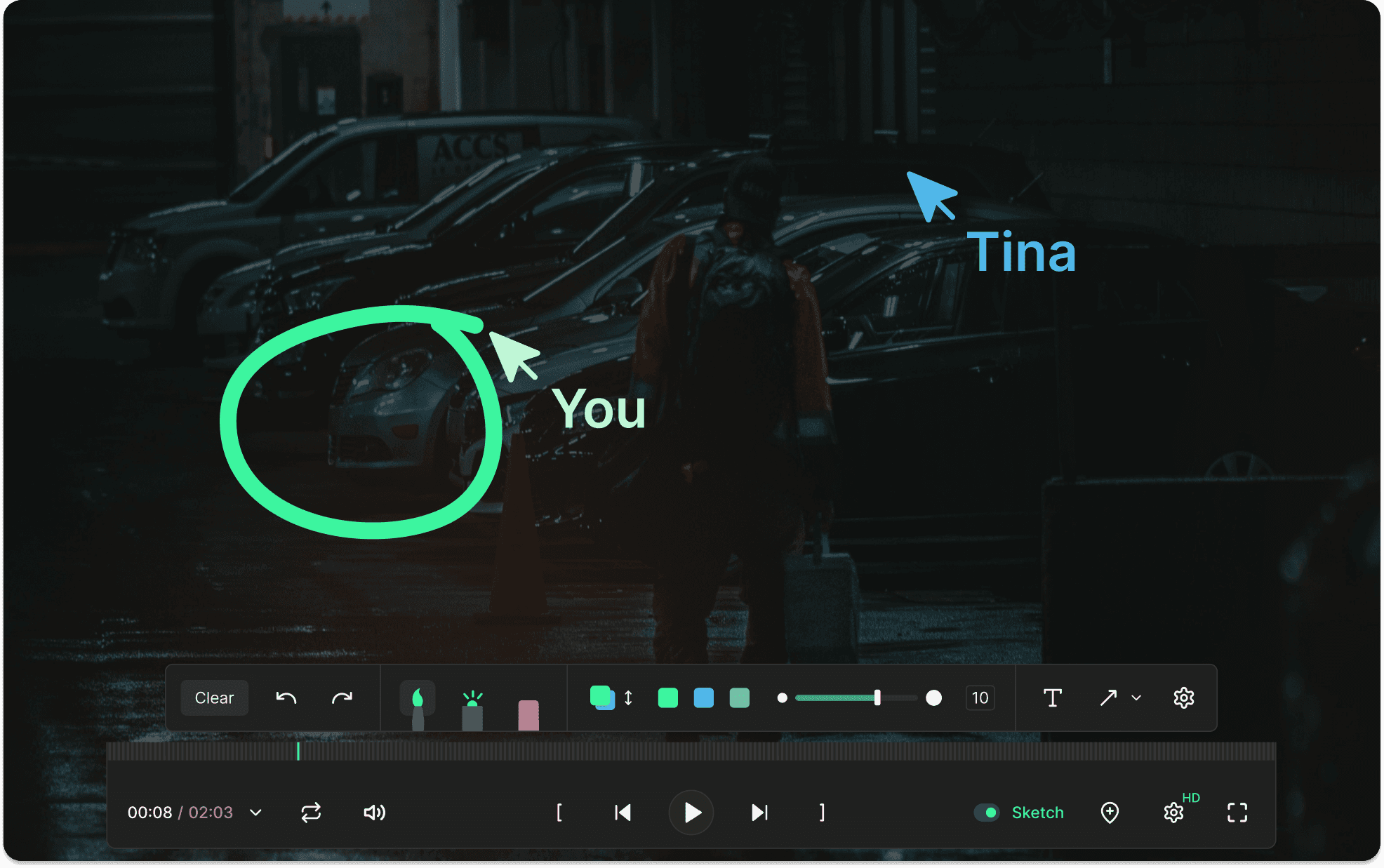
Review assets in a synchronised player, and annotate together. Switch between files, everything will be synchronised between collaborators in real-time. Now in crisp HDR quality.


Get feedback
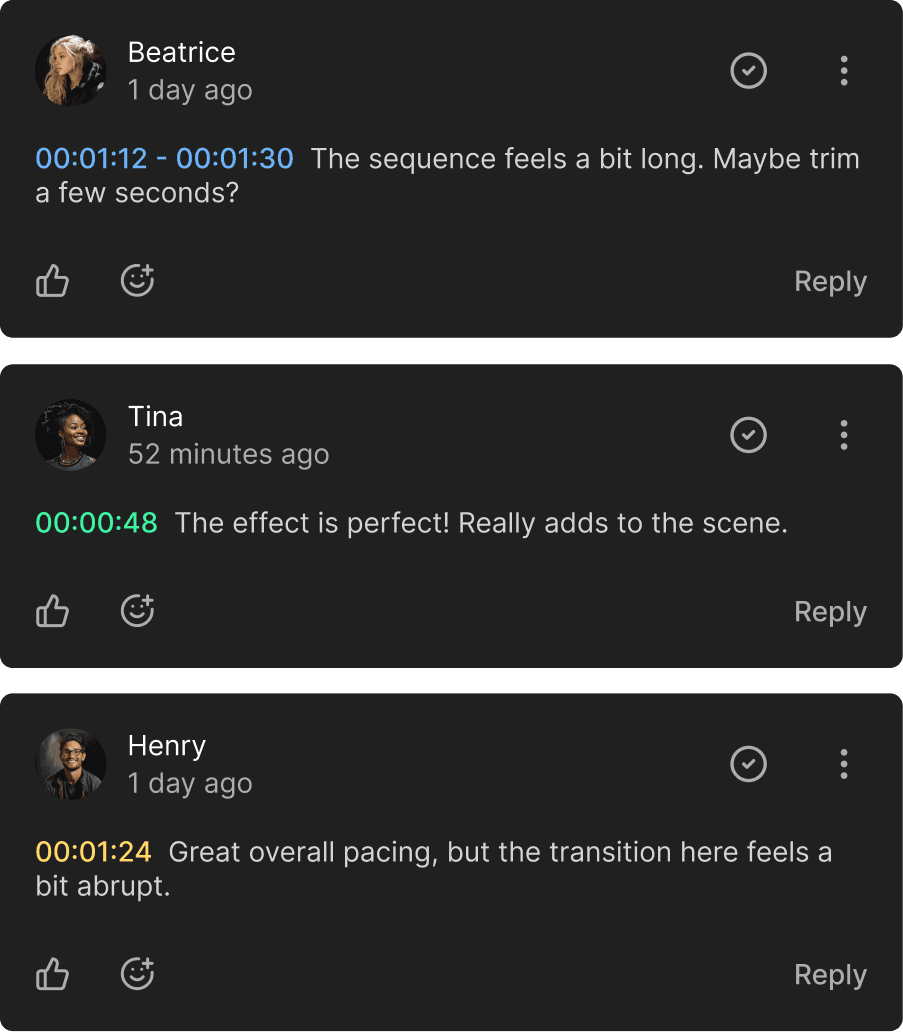
Markers and annotations lets you review everything from edits to grade and VFX. Let the conversation flow. Easily divided into internal and external threads.


Import your markers
Import your markers into Adobe Premiere, After Effects, DaVinci Resolve, Avid Media Composer, and Autodesk Flame.




Ultra-low latency streaming
Take advantage of KLASH real-time live streaming that lets you stream in up to 4K UHD in ultra-low latency, with stereo sound. Perfect for everything from real-time edit reviews to color correction sessions.

● LIVE
Lift
Gamma
Gain
Offset
Lift
Gamma
Gain
Offset

● LIVE
Lift
Gamma
Gain
Offset
Lift
Gamma
Gain
Offset

● LIVE
Lift
Gamma
Gain
Offset
Lift
Gamma
Gain
Offset
Audio linking
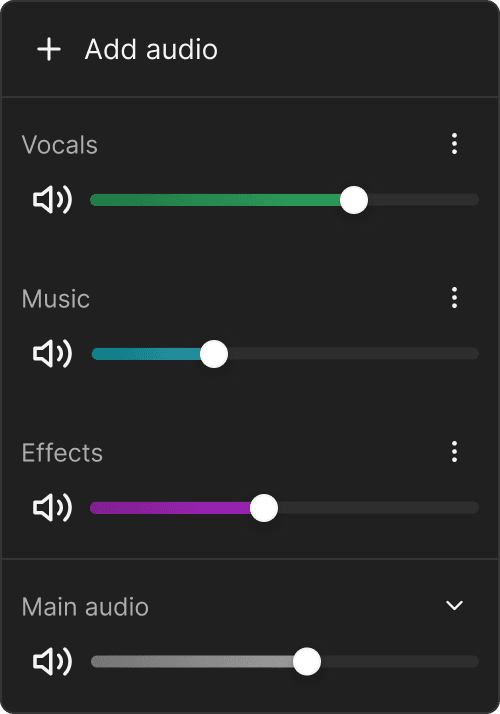
Upload audio tracks directly to KLASH and link them to existing videos. No need to render new files.


You can have all your movie masters in one simple and secure location
Share test screenings securely
Share simplified video players directly from KLASH in ultra-high quality. Protect with Two-factor, time windows, watermarks, and more. Isolated share chats allow for waterproof communication between you and external users.


Know your audience, and prevent leaks
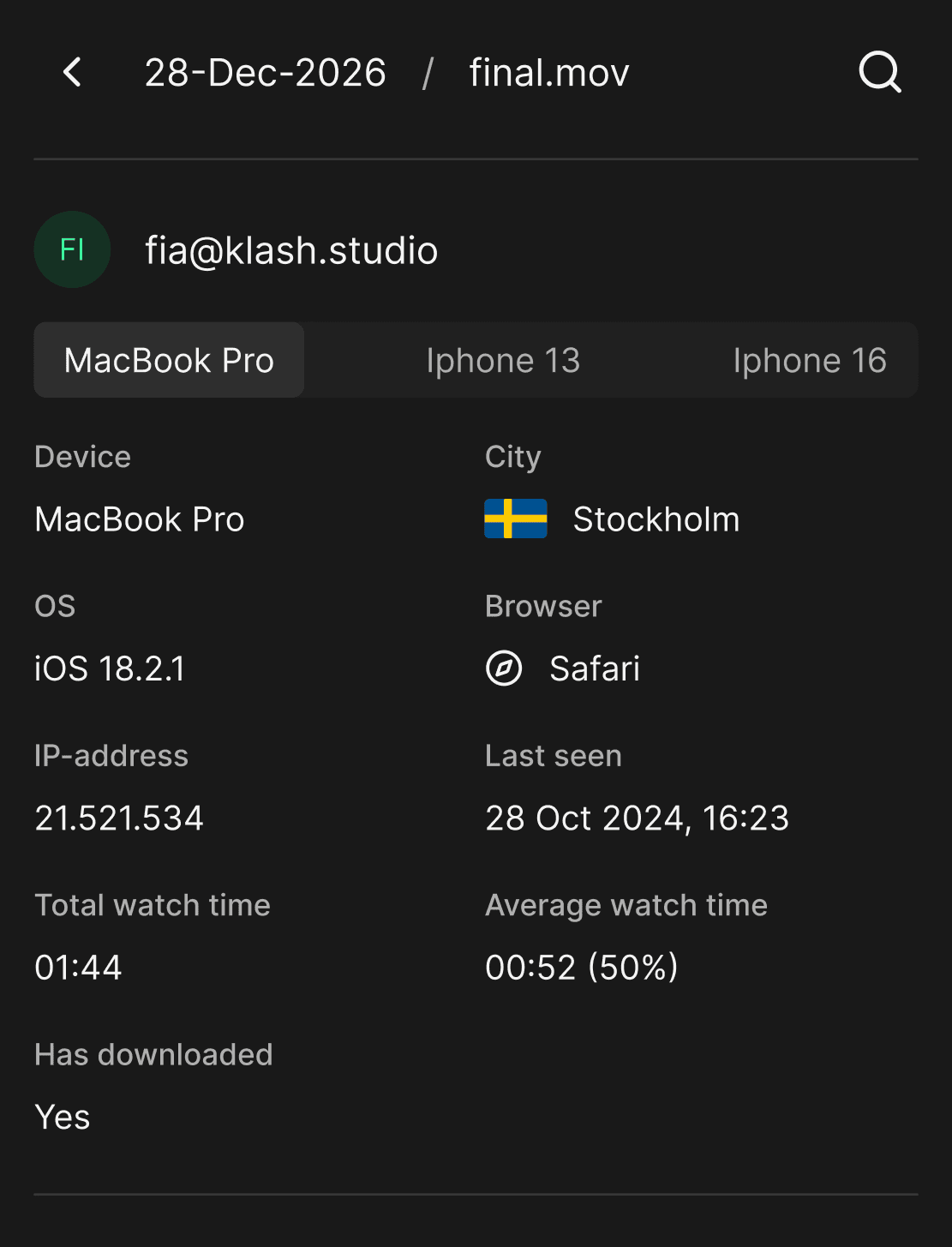
See who watched your film, when, and for how long. Coming soon: device, OS, IP, geo location and browser tracking.


Integrations for your workflow

DaVinci Resolve
Import your KLASH feedback comments and markers into DaVinci Resolve. Coming soon: Import your DaVinci Resolve markers into KLASH.

Adobe Premiere
Import your KLASH feedback comments and markers into Adobe Premiere. Coming soon: Import your Adobe Premiere markers into KLASH.

Silverstack
Import Silverstack XMLs into KLASH to populate your clips with metadata. Not only scene, shot and take, but also comments and shot descriptions from the script report.

Avid Media Composer
Import your KLASH feedback comments and markers into Avid Media Composer. Coming soon: Import your Avid Media Composer into KLASH.

Adobe After Effects
Import your KLASH feedback comments and markers into Adobe After Effects. Coming soon: Import your Adobe After Effects into KLASH.

Autodesk Flame
Import your KLASH feedback comments and markers into Autodesk Flame. Coming soon: Import your Autodesk Flame markers into KLASH.

Slack
With the Slack plugin, your Slack workspace will be connected to KLASH. Mention Slack users and channels directly on KLASH to send them your comment, together with a screenshots, and a direct link taking them to your comment and the exact timeline frame.

Jira
With the Jira plugin, you will get a complete production tracking platform on KLASH. Link files and folders, tasks, statuses, time tracking and more in two-way sync. KLASH supports both Jira Cloud and Jira Data Center (Jira Server), which is your own local Jira instance.

Avid ALE
Import Avid ALE files into KLASH to populate your clips with metadata.

DaVinci Resolve
Import your KLASH feedback comments and markers into DaVinci Resolve. Coming soon: Import your DaVinci Resolve markers into KLASH.

Adobe Premiere
Import your KLASH feedback comments and markers into Adobe Premiere. Coming soon: Import your Adobe Premiere markers into KLASH.

Silverstack
Import Silverstack XMLs into KLASH to populate your clips with metadata. Not only scene, shot and take, but also comments and shot descriptions from the script report.

Avid Media Composer
Import your KLASH feedback comments and markers into Avid Media Composer. Coming soon: Import your Avid Media Composer into KLASH.

Adobe After Effects
Import your KLASH feedback comments and markers into Adobe After Effects. Coming soon: Import your Adobe After Effects into KLASH.

Autodesk Flame
Import your KLASH feedback comments and markers into Autodesk Flame. Coming soon: Import your Autodesk Flame markers into KLASH.

Slack
With the Slack plugin, your Slack workspace will be connected to KLASH. Mention Slack users and channels directly on KLASH to send them your comment, together with a screenshots, and a direct link taking them to your comment and the exact timeline frame.

Jira
With the Jira plugin, you will get a complete production tracking platform on KLASH. Link files and folders, tasks, statuses, time tracking and more in two-way sync. KLASH supports both Jira Cloud and Jira Data Center (Jira Server), which is your own local Jira instance.

Avid ALE
Import Avid ALE files into KLASH to populate your clips with metadata.

DaVinci Resolve
Import your KLASH feedback comments and markers into DaVinci Resolve. Coming soon: Import your DaVinci Resolve markers into KLASH.

Adobe Premiere
Import your KLASH feedback comments and markers into Adobe Premiere. Coming soon: Import your Adobe Premiere markers into KLASH.

Silverstack
Import Silverstack XMLs into KLASH to populate your clips with metadata. Not only scene, shot and take, but also comments and shot descriptions from the script report.

Avid Media Composer
Import your KLASH feedback comments and markers into Avid Media Composer. Coming soon: Import your Avid Media Composer into KLASH.

Adobe After Effects
Import your KLASH feedback comments and markers into Adobe After Effects. Coming soon: Import your Adobe After Effects into KLASH.

Autodesk Flame
Import your KLASH feedback comments and markers into Autodesk Flame. Coming soon: Import your Autodesk Flame markers into KLASH.

Slack
With the Slack plugin, your Slack workspace will be connected to KLASH. Mention Slack users and channels directly on KLASH to send them your comment, together with a screenshots, and a direct link taking them to your comment and the exact timeline frame.

Jira
With the Jira plugin, you will get a complete production tracking platform on KLASH. Link files and folders, tasks, statuses, time tracking and more in two-way sync. KLASH supports both Jira Cloud and Jira Data Center (Jira Server), which is your own local Jira instance.

Avid ALE
Import Avid ALE files into KLASH to populate your clips with metadata.

DaVinci Resolve
Import your KLASH feedback comments and markers into DaVinci Resolve. Coming soon: Import your DaVinci Resolve markers into KLASH.

Adobe Premiere
Import your KLASH feedback comments and markers into Adobe Premiere. Coming soon: Import your Adobe Premiere markers into KLASH.

Silverstack
Import Silverstack XMLs into KLASH to populate your clips with metadata. Not only scene, shot and take, but also comments and shot descriptions from the script report.

Avid Media Composer
Import your KLASH feedback comments and markers into Avid Media Composer. Coming soon: Import your Avid Media Composer into KLASH.

Adobe After Effects
Import your KLASH feedback comments and markers into Adobe After Effects. Coming soon: Import your Adobe After Effects into KLASH.

Autodesk Flame
Import your KLASH feedback comments and markers into Autodesk Flame. Coming soon: Import your Autodesk Flame markers into KLASH.

Slack
With the Slack plugin, your Slack workspace will be connected to KLASH. Mention Slack users and channels directly on KLASH to send them your comment, together with a screenshots, and a direct link taking them to your comment and the exact timeline frame.

Jira
With the Jira plugin, you will get a complete production tracking platform on KLASH. Link files and folders, tasks, statuses, time tracking and more in two-way sync. KLASH supports both Jira Cloud and Jira Data Center (Jira Server), which is your own local Jira instance.

Avid ALE
Import Avid ALE files into KLASH to populate your clips with metadata.

DaVinci Resolve
Import your KLASH feedback comments and markers into DaVinci Resolve. Coming soon: Import your DaVinci Resolve markers into KLASH.

Adobe Premiere
Import your KLASH feedback comments and markers into Adobe Premiere. Coming soon: Import your Adobe Premiere markers into KLASH.

Silverstack
Import Silverstack XMLs into KLASH to populate your clips with metadata. Not only scene, shot and take, but also comments and shot descriptions from the script report.

Avid Media Composer
Import your KLASH feedback comments and markers into Avid Media Composer. Coming soon: Import your Avid Media Composer into KLASH.

Adobe After Effects
Import your KLASH feedback comments and markers into Adobe After Effects. Coming soon: Import your Adobe After Effects into KLASH.

Autodesk Flame
Import your KLASH feedback comments and markers into Autodesk Flame. Coming soon: Import your Autodesk Flame markers into KLASH.

Slack
With the Slack plugin, your Slack workspace will be connected to KLASH. Mention Slack users and channels directly on KLASH to send them your comment, together with a screenshots, and a direct link taking them to your comment and the exact timeline frame.

Jira
With the Jira plugin, you will get a complete production tracking platform on KLASH. Link files and folders, tasks, statuses, time tracking and more in two-way sync. KLASH supports both Jira Cloud and Jira Data Center (Jira Server), which is your own local Jira instance.

Avid ALE
Import Avid ALE files into KLASH to populate your clips with metadata.

DaVinci Resolve
Import your KLASH feedback comments and markers into DaVinci Resolve. Coming soon: Import your DaVinci Resolve markers into KLASH.

Adobe Premiere
Import your KLASH feedback comments and markers into Adobe Premiere. Coming soon: Import your Adobe Premiere markers into KLASH.

Silverstack
Import Silverstack XMLs into KLASH to populate your clips with metadata. Not only scene, shot and take, but also comments and shot descriptions from the script report.

Avid Media Composer
Import your KLASH feedback comments and markers into Avid Media Composer. Coming soon: Import your Avid Media Composer into KLASH.

Adobe After Effects
Import your KLASH feedback comments and markers into Adobe After Effects. Coming soon: Import your Adobe After Effects into KLASH.

Autodesk Flame
Import your KLASH feedback comments and markers into Autodesk Flame. Coming soon: Import your Autodesk Flame markers into KLASH.

Slack
With the Slack plugin, your Slack workspace will be connected to KLASH. Mention Slack users and channels directly on KLASH to send them your comment, together with a screenshots, and a direct link taking them to your comment and the exact timeline frame.

Jira
With the Jira plugin, you will get a complete production tracking platform on KLASH. Link files and folders, tasks, statuses, time tracking and more in two-way sync. KLASH supports both Jira Cloud and Jira Data Center (Jira Server), which is your own local Jira instance.

Avid ALE
Import Avid ALE files into KLASH to populate your clips with metadata.

DaVinci Resolve
Import your KLASH feedback comments and markers into DaVinci Resolve. Coming soon: Import your DaVinci Resolve markers into KLASH.

Adobe Premiere
Import your KLASH feedback comments and markers into Adobe Premiere. Coming soon: Import your Adobe Premiere markers into KLASH.

Silverstack
Import Silverstack XMLs into KLASH to populate your clips with metadata. Not only scene, shot and take, but also comments and shot descriptions from the script report.

Avid Media Composer
Import your KLASH feedback comments and markers into Avid Media Composer. Coming soon: Import your Avid Media Composer into KLASH.

Adobe After Effects
Import your KLASH feedback comments and markers into Adobe After Effects. Coming soon: Import your Adobe After Effects into KLASH.

Autodesk Flame
Import your KLASH feedback comments and markers into Autodesk Flame. Coming soon: Import your Autodesk Flame markers into KLASH.

Slack
With the Slack plugin, your Slack workspace will be connected to KLASH. Mention Slack users and channels directly on KLASH to send them your comment, together with a screenshots, and a direct link taking them to your comment and the exact timeline frame.

Jira
With the Jira plugin, you will get a complete production tracking platform on KLASH. Link files and folders, tasks, statuses, time tracking and more in two-way sync. KLASH supports both Jira Cloud and Jira Data Center (Jira Server), which is your own local Jira instance.

Avid ALE
Import Avid ALE files into KLASH to populate your clips with metadata.

DaVinci Resolve
Import your KLASH feedback comments and markers into DaVinci Resolve. Coming soon: Import your DaVinci Resolve markers into KLASH.

Adobe Premiere
Import your KLASH feedback comments and markers into Adobe Premiere. Coming soon: Import your Adobe Premiere markers into KLASH.

Silverstack
Import Silverstack XMLs into KLASH to populate your clips with metadata. Not only scene, shot and take, but also comments and shot descriptions from the script report.

Avid Media Composer
Import your KLASH feedback comments and markers into Avid Media Composer. Coming soon: Import your Avid Media Composer into KLASH.

Adobe After Effects
Import your KLASH feedback comments and markers into Adobe After Effects. Coming soon: Import your Adobe After Effects into KLASH.

Autodesk Flame
Import your KLASH feedback comments and markers into Autodesk Flame. Coming soon: Import your Autodesk Flame markers into KLASH.

Slack
With the Slack plugin, your Slack workspace will be connected to KLASH. Mention Slack users and channels directly on KLASH to send them your comment, together with a screenshots, and a direct link taking them to your comment and the exact timeline frame.

Jira
With the Jira plugin, you will get a complete production tracking platform on KLASH. Link files and folders, tasks, statuses, time tracking and more in two-way sync. KLASH supports both Jira Cloud and Jira Data Center (Jira Server), which is your own local Jira instance.

Avid ALE
Import Avid ALE files into KLASH to populate your clips with metadata.

DaVinci Resolve
Import your KLASH feedback comments and markers into DaVinci Resolve. Coming soon: Import your DaVinci Resolve markers into KLASH.

Adobe Premiere
Import your KLASH feedback comments and markers into Adobe Premiere. Coming soon: Import your Adobe Premiere markers into KLASH.

Silverstack
Import Silverstack XMLs into KLASH to populate your clips with metadata. Not only scene, shot and take, but also comments and shot descriptions from the script report.

Avid Media Composer
Import your KLASH feedback comments and markers into Avid Media Composer. Coming soon: Import your Avid Media Composer into KLASH.

Adobe After Effects
Import your KLASH feedback comments and markers into Adobe After Effects. Coming soon: Import your Adobe After Effects into KLASH.

Autodesk Flame
Import your KLASH feedback comments and markers into Autodesk Flame. Coming soon: Import your Autodesk Flame markers into KLASH.

Slack
With the Slack plugin, your Slack workspace will be connected to KLASH. Mention Slack users and channels directly on KLASH to send them your comment, together with a screenshots, and a direct link taking them to your comment and the exact timeline frame.

Jira
With the Jira plugin, you will get a complete production tracking platform on KLASH. Link files and folders, tasks, statuses, time tracking and more in two-way sync. KLASH supports both Jira Cloud and Jira Data Center (Jira Server), which is your own local Jira instance.

Avid ALE
Import Avid ALE files into KLASH to populate your clips with metadata.

DaVinci Resolve
Import your KLASH feedback comments and markers into DaVinci Resolve. Coming soon: Import your DaVinci Resolve markers into KLASH.

Adobe Premiere
Import your KLASH feedback comments and markers into Adobe Premiere. Coming soon: Import your Adobe Premiere markers into KLASH.

Silverstack
Import Silverstack XMLs into KLASH to populate your clips with metadata. Not only scene, shot and take, but also comments and shot descriptions from the script report.

Avid Media Composer
Import your KLASH feedback comments and markers into Avid Media Composer. Coming soon: Import your Avid Media Composer into KLASH.

Adobe After Effects
Import your KLASH feedback comments and markers into Adobe After Effects. Coming soon: Import your Adobe After Effects into KLASH.

Autodesk Flame
Import your KLASH feedback comments and markers into Autodesk Flame. Coming soon: Import your Autodesk Flame markers into KLASH.

Slack
With the Slack plugin, your Slack workspace will be connected to KLASH. Mention Slack users and channels directly on KLASH to send them your comment, together with a screenshots, and a direct link taking them to your comment and the exact timeline frame.

Jira
With the Jira plugin, you will get a complete production tracking platform on KLASH. Link files and folders, tasks, statuses, time tracking and more in two-way sync. KLASH supports both Jira Cloud and Jira Data Center (Jira Server), which is your own local Jira instance.

Avid ALE
Import Avid ALE files into KLASH to populate your clips with metadata.

DaVinci Resolve
Import your KLASH feedback comments and markers into DaVinci Resolve. Coming soon: Import your DaVinci Resolve markers into KLASH.

Adobe Premiere
Import your KLASH feedback comments and markers into Adobe Premiere. Coming soon: Import your Adobe Premiere markers into KLASH.

Silverstack
Import Silverstack XMLs into KLASH to populate your clips with metadata. Not only scene, shot and take, but also comments and shot descriptions from the script report.

Avid Media Composer
Import your KLASH feedback comments and markers into Avid Media Composer. Coming soon: Import your Avid Media Composer into KLASH.

Adobe After Effects
Import your KLASH feedback comments and markers into Adobe After Effects. Coming soon: Import your Adobe After Effects into KLASH.

Autodesk Flame
Import your KLASH feedback comments and markers into Autodesk Flame. Coming soon: Import your Autodesk Flame markers into KLASH.

Slack
With the Slack plugin, your Slack workspace will be connected to KLASH. Mention Slack users and channels directly on KLASH to send them your comment, together with a screenshots, and a direct link taking them to your comment and the exact timeline frame.

Jira
With the Jira plugin, you will get a complete production tracking platform on KLASH. Link files and folders, tasks, statuses, time tracking and more in two-way sync. KLASH supports both Jira Cloud and Jira Data Center (Jira Server), which is your own local Jira instance.

Avid ALE
Import Avid ALE files into KLASH to populate your clips with metadata.

DaVinci Resolve
Import your KLASH feedback comments and markers into DaVinci Resolve. Coming soon: Import your DaVinci Resolve markers into KLASH.

Adobe Premiere
Import your KLASH feedback comments and markers into Adobe Premiere. Coming soon: Import your Adobe Premiere markers into KLASH.

Silverstack
Import Silverstack XMLs into KLASH to populate your clips with metadata. Not only scene, shot and take, but also comments and shot descriptions from the script report.

Avid Media Composer
Import your KLASH feedback comments and markers into Avid Media Composer. Coming soon: Import your Avid Media Composer into KLASH.

Adobe After Effects
Import your KLASH feedback comments and markers into Adobe After Effects. Coming soon: Import your Adobe After Effects into KLASH.

Autodesk Flame
Import your KLASH feedback comments and markers into Autodesk Flame. Coming soon: Import your Autodesk Flame markers into KLASH.

Slack
With the Slack plugin, your Slack workspace will be connected to KLASH. Mention Slack users and channels directly on KLASH to send them your comment, together with a screenshots, and a direct link taking them to your comment and the exact timeline frame.

Jira
With the Jira plugin, you will get a complete production tracking platform on KLASH. Link files and folders, tasks, statuses, time tracking and more in two-way sync. KLASH supports both Jira Cloud and Jira Data Center (Jira Server), which is your own local Jira instance.

Avid ALE
Import Avid ALE files into KLASH to populate your clips with metadata.
Case studies


Göteborg Film Festival
This is behind the scenes of the ever-transforming event. KLASH is a proud partner with Göteborg Film Festival.
“Using KLASH in the past three years has helped us centralize a lot of material deliveries and created a smooth exchange with our collaborators.” Liisa Nurmela, Industry Communication Manager




Un Poeta
Learn more about how the award-winning film Un Poeta used KLASH in their production.
“The possibility to log in and see the dailies on KLASH was indispensable”, Anschul Brandt, Post-production Coordinator





Sentimental Value
Learn more about how the critically acclaimed Sentimental value used KLASH to boost production efficiency.
“We used KLASH as our primary feedback tool, which was invaluable…” Johannes Skoog, VP Supervisor, VP Nordic


Klassen
Awarded for Sweden's Best Children show, BBC Studios Nordic creates the megahit pre-teen series with the help of KLASH.
“The KLASH platform is super easy to use” Erik Björkheim, Production Manager